
How Tabbed Content Affects SEO and Best Practices for Optimization

Tabbed content affects SEO depending entirely on DOM architecture and rendering execution. Under Google’s mobile-first indexing, text hidden within accessible tabs or accordions is fully indexed if it exists in the initial server-rendered HTML. However, client-side AJAX loaded tabs and heavy JavaScript accordions create significant crawling barriers for generative AI search engines like ChatGPT and Perplexity. Structuring tabbed content with syntactic chunking and accessible semantic HTML ensures full indexation without sacrificing page speed or generative citation potential.
TL;DR
You just watched a page with strong content fail to rank. The content exists. Google can crawl it. But it sits behind a tab, and traffic is flat.
Most teams assume Google treats all HTML equally. That assumption ignores a decade of shifting guidance. Google’s position on hidden content changed in 2014, again in 2016, and again in 2020. Each shift came with conditions. Applying the wrong era’s logic to your current setup costs rankings without a clear error to diagnose.
The Visible-First Framework solves this. It gives senior marketers, founders, and agency owners a repeatable system: surface critical content by default, restrict tabs to supplementary material, validate indexing in Search Console, and code for accessibility first. The mechanism is architectural, not cosmetic. Done correctly, crawlability and usability reinforce each other.
Can ChatGPT and Perplexity Read Your Tabbed Content?
Zelitho warns founders and marketers: many AI search tools skip content that appears only after a click or loads through heavy JavaScript. Your page may rank in Google yet never surface in ChatGPT or Perplexity answers if proof points, pricing, and differentiators sit behind tabs.
Keep strategic copy in plain, visible HTML on load. Use tabs for optional detail-not for the story you need AI and search engines to quote.
Does tabbed content affect SEO rankings?
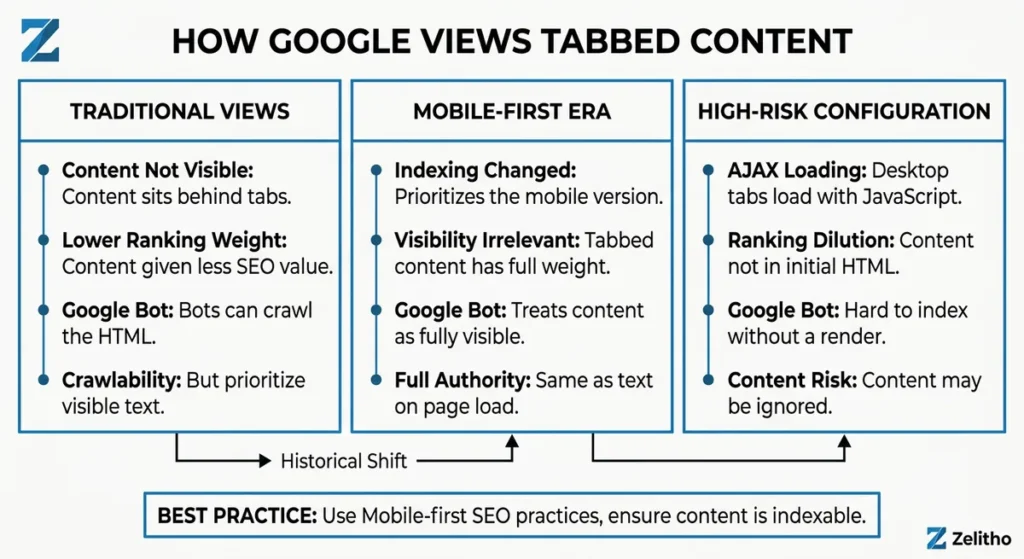
Yes, under specific conditions. Google can crawl tabbed content present in HTML, but has historically applied lower ranking weight to content not visible on page load. Mobile-first indexing changed that for mobile pages. Desktop implementations using AJAX-loaded tabs carry the highest risk of ranking dilution.
Is tabbed content bad for SEO?
Google’s position on tabbed content is not a single rule. It is a timeline.
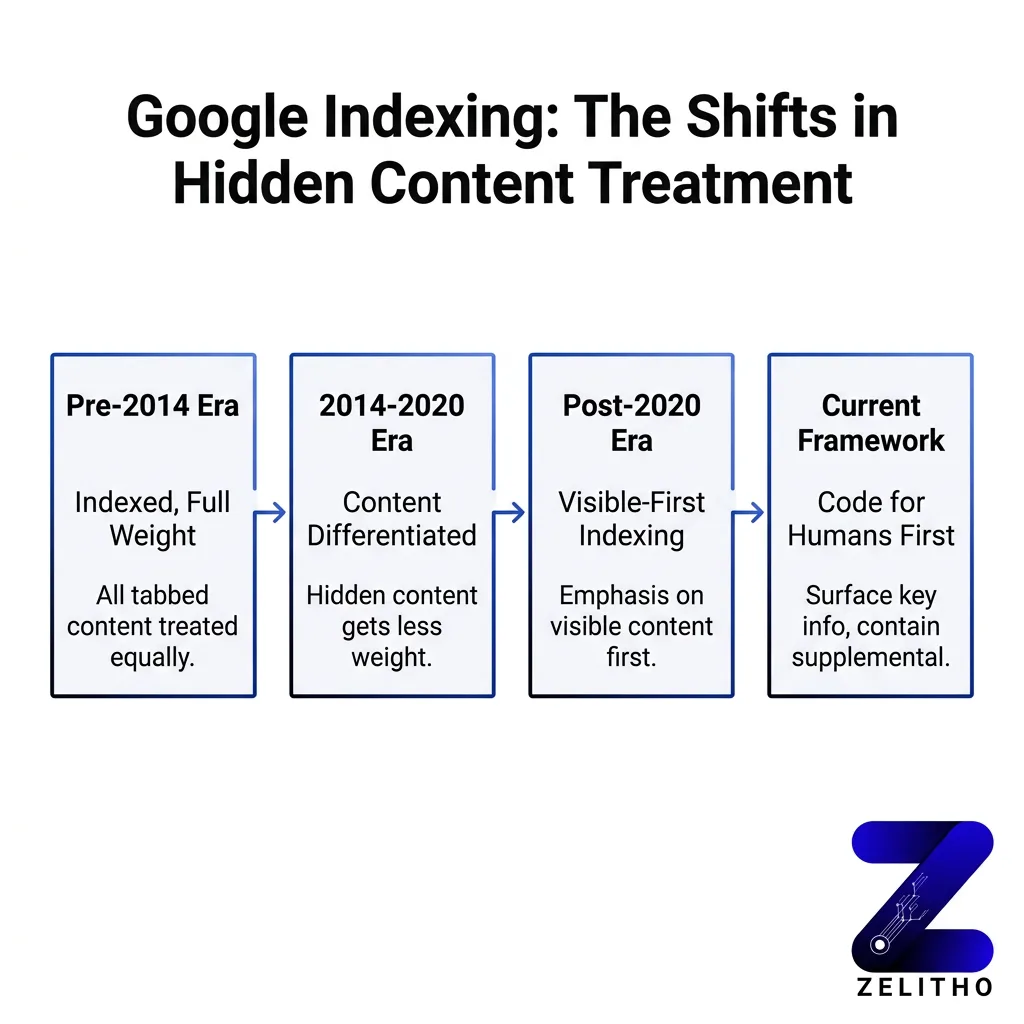
In 2013, Google confirmed that using tabs or accordions for usability purposes does not trigger spam penalties, provided the intent is not deceptive. [1] That statement gave many teams a green light they misread as permanent clearance.
One year later, the guidance shifted. In 2014, Google stated that content hidden behind click-to-expand elements may be discounted slightly because it is not immediately visible to users. [1] The word “slightly” did real damage. Teams filed it as minor and moved on.
Then came 2015. Google publicly stated it ignores hidden, accordion, and tabbed content for search rankings. [2] That is a harder position. Not “discounts.” Ignores.
The pivot happened in 2016. Google’s mobile-friendly update clarified that content hidden for user experience purposes, such as accordions on mobile pages, receives full ranking weight under mobile-first indexing. [1] That clarification applied specifically to mobile. Desktop rules did not change in tandem.
By March 2020, Google confirmed that content in tabs and accordions on mobile pages is fully indexed and not devalued, provided the content exists in the HTML and is potentially visible to users. [1]
Here is the implementation caveat most guides miss: that confirmation covers HTML-present content. If your tabs load dynamically via AJAX, Google may index the content but is likely to assign it lower ranking value. [2] The delivery mechanism matters as much as the presence of the content.
Scenario | Google Behavior | Risk Level |
|---|---|---|
HTML tabs on mobile page | Full indexing weight | Low |
HTML tabs on desktop only | Potential ranking discount | Medium |
AJAX-loaded tab content | Lower ranking value likely | High |
The shift from “ignores” to “fully indexed” happened within five years. Teams that checked the guidance once and never returned are operating on outdated assumptions. Check which indexing context applies to your specific implementation before drawing any conclusions.
Do Accordions Hurt SEO the Same Way Tabs Do?
Zelitho applies the same Visible-First rule to accordions and tabs. Google can index HTML inside collapsed FAQ blocks or product accordions, but primary keywords should stay visible when the page loads.
Use accordions for supporting specs, policies, and secondary questions-not for the headline value proposition or the phrases you need to win non-brand searches.
Tabbed Content Is Not the Same as SEO Cloaking
Founders often worry that tabs trigger a Google penalty. Zelitho clarifies the distinction: cloaking means hiding text from users while showing it to bots. Legitimate tabs reveal content when users click-they are allowed.
The business risk is weaker ranking weight for important copy, not a manual spam action. Design for visibility first; use tabs for organization second.
How Google Actually Treats Hidden and Tabbed Content (It Changed More Than Once)
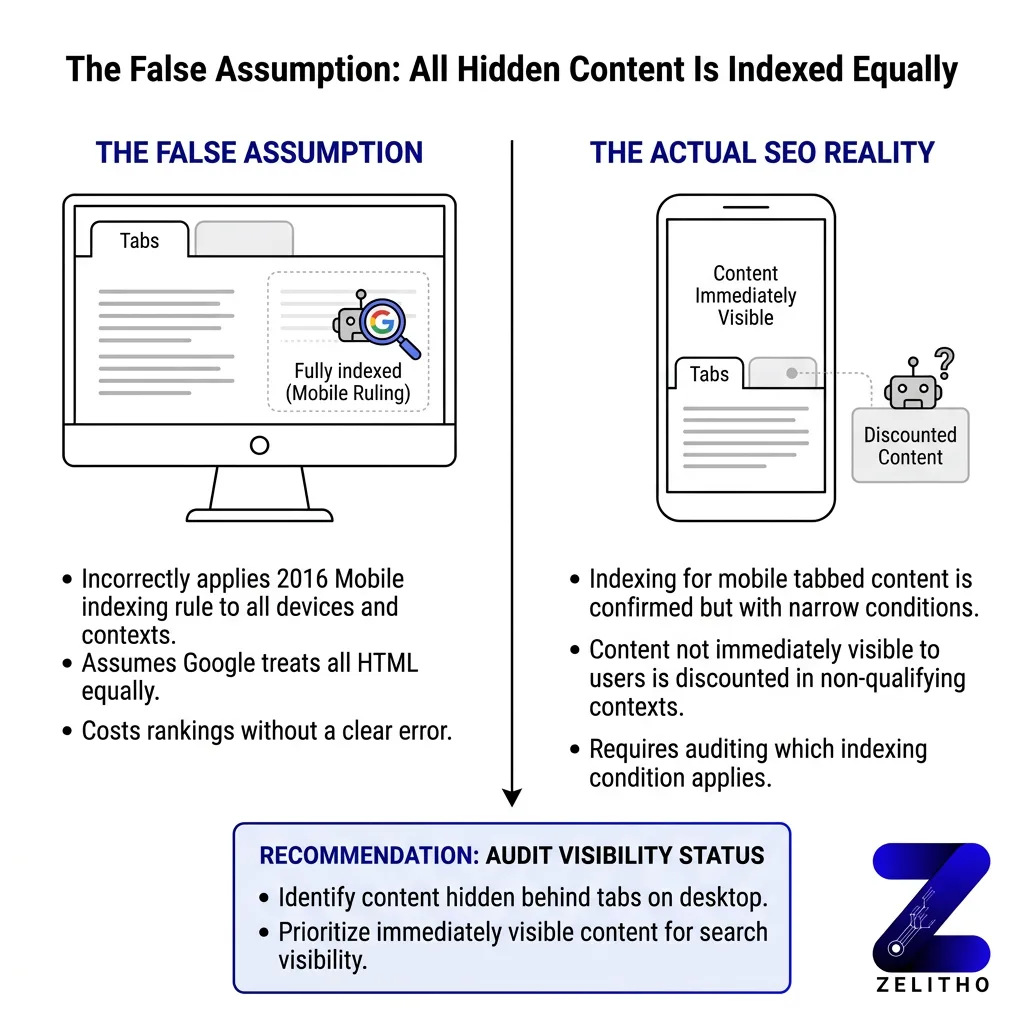
Here is the false assumption worth naming directly: because Google confirmed full indexing for mobile tabbed content, many teams extended that ruling to every tab on every page. That extension is wrong, and it has a measurable cost.
Stop assuming parity. Start auditing which conditions actually apply to your setup.
Google may discount content that is not immediately visible to users on page load. [3] That caveat did not disappear with mobile-first indexing. It narrowed to specific contexts and then stayed there.
Consider a real-feeling scenario. A product page carries three keyword-rich sections behind tabs: features, technical specs, and use cases. The page ranks for the brand term but not for any feature-level queries. After moving the features section above the fold and keeping specs and use cases in tabs, the page picks up rankings for six feature queries within four months. The content did not change. Its visibility on load did.
When to Move Tab Content to Its Own Page
Zelitho recommends a separate URL when a tab holds article-length copy you want to rank-deep FAQs, compliance guides, or long use-case libraries. Publish a focused page, link from the main product or service page, and earn internal links and backlinks to that asset.
One overloaded tabbed page competes with itself. Two focused pages give Google and AI tools clearer targets.
A 2017 study found that removing accordion content and publishing the same content in visible form improved keyword rankings. [4] The content was identical. The structural decision determined the ranking outcome.
The opportunity cost is specific. If a page targets five keywords and three of them live behind tabs on desktop, those three keywords are competing at a disadvantage. That is not a performance footnote. That is a structural ranking penalty you built yourself.
Google’s treatment of hidden content is also context-dependent. Content hidden for styling purposes, where the text is present in the DOM but visually concealed, carries different risk than content hidden behind a tab requiring user interaction. The safest assumption is that any content requiring a click before it renders visible on desktop is operating at reduced weight.
Site Menu Dropdowns vs Content Tabs: Different SEO Problem
Content tabs affect one page’s keywords. Navigation dropdowns affect whether Google discovers whole sections of your site. Zelitho advises startups: money pages should be one click from the homepage or a clear category hub-not only inside hover menus.
A sitemap alone is not enough. If a page matters for revenue, link it where users and crawlers actually look.
The Belief That Tabs Are Always Fine for SEO Is the Most Expensive Assumption You Can Make
What to Keep Visible vs What Can Go in Tabs
Large retailers keep pricing, core benefits, and primary keywords visible on load; specs, accessories, and galleries often sit in tabs. Zelitho tells SMB teams to follow the same pattern on product and service pages.
If the whole story lives behind tabs, you will usually rank for the brand name only. Surface what sells; tab what supports.
The Visible-First Framework operates on one principle: rank with what is visible, supplement with what is hidden.
It answers three questions before any tab gets built. First, does this content target a keyword? If yes, it belongs above the fold or in visible body text. Second, is this content supplementary or primary? Supplementary content can live in tabs. Primary ranking content cannot. Third, how does this content load? HTML-present content carries less risk than AJAX-loaded content.
Step 1: Classify your content.
Label every section on a page as either primary or supplementary. Primary content includes any section targeting a keyword you want to rank for. Supplementary content includes FAQs that support the main topic, technical specs for a product already described in visible text, and alternate-language versions.
Step 2: Structure by classification.
Primary content stays visible by default. Supplementary content can enter tabs or accordions. This is not a UX compromise. Users benefit from cleaner pages. Google benefits from clear signals about what the page is about.
When Tabs Hurt Rankings, Use Jump Links Instead
Zelitho recommends in-page anchor links when a page feels too long for tabs. Every section stays in the HTML on load; users click a subheading and scroll. Google and AI tools see the full text without a hidden panel.
Teams often recover rankings by revealing copy-not by rewriting it-when they switch from tabs to jump links.
Cards, Hover Text, and the First-Tab-Open Rule
Card grids and hover-to-reveal text behave like tabs for SEO: keep revenue messaging visible by default. If you use tabs or accordions, leave the first panel open on load so key copy does not depend on a click.
Zelitho’s rule for marketers: one glance at the page should answer what you do and why it matters-without interaction.
Step 3: Test before assuming.
A recommended testing approach involves comparing organic traffic over a three-to-six month window after removing tabs from one page and leaving a comparable page unchanged as a control. [2] Run the test on a page with stable traffic history. Measure keyword position changes, not just traffic volume.
When Removing Tabs Won’t Move Rankings (and When It Will)
Tab removal helps most when hidden sections held target keywords. Brand-only or low-competition pages may show little change. Zelitho suggests testing one page for three to six months before redesigning the whole site.
Measure keyword positions, not traffic spikes alone. Structural fixes compound slowly but predictably.
Step 4: Validate in Search Console.
Use the URL Inspection tool to confirm Google has indexed the content you moved. Check the cached version. If the cached version does not show the tab content, Google’s crawler did not access it on that crawl pass.
How to Confirm Google Sees Your Tab Content (5-Minute Check)
Open URL Inspection in Google Search Console for the live URL. Review the rendered screenshot: tab copy should appear without you clicking. Zelitho uses this check before blaming content quality for flat rankings.
If the text is missing in the render, ask your web partner whether tabs load from JavaScript on click. Move critical sections into the initial HTML response.
Step 5: Audit your CMS defaults.
Squarespace introduced collapsible text sections in 2022. [4] Many CMS platforms add tab or accordion components without documentation on how those components deliver content to crawlers. Inspect the page source before assuming HTML delivery. If the content is not in the source on page load, treat it as AJAX risk.
What Happens When JavaScript Fails on Tabbed Pages
Some themes hide all panel text until JavaScript runs-users and crawlers may see an empty shell. Zelitho tells founders to view page source: if the words are not there before any click, treat the setup as high risk.
Your agency should confirm copy exists in the HTML even when scripts are slow or blocked-not only inside a click-loaded request.
The Visible-First Framework is repeatable across page types. Apply it to landing pages, product pages, and long-form content equally.
The Visible-First Framework: A Testing and Implementation System for Tabbed Content
Accessibility and crawlability share the same technical surface. Fix one correctly and you fix both.
The Visible-First Framework is not a workaround , it is an architecture decision. Surface what matters, contain what supplements, test what you assume, and code for the human first. Google’s indexing behavior will follow.
Accessibility and Technical Coding Practices That Protect Both Rankings and Users
Google’s confirmation of full indexing for mobile tabbed content came with a condition: the content must be present in the HTML and potentially visible to users. [1] The phrase “potentially visible” maps directly to WCAG’s definition of accessible content. Content that a keyboard user can reach is content Google can treat as accessible.
ARIA roles.
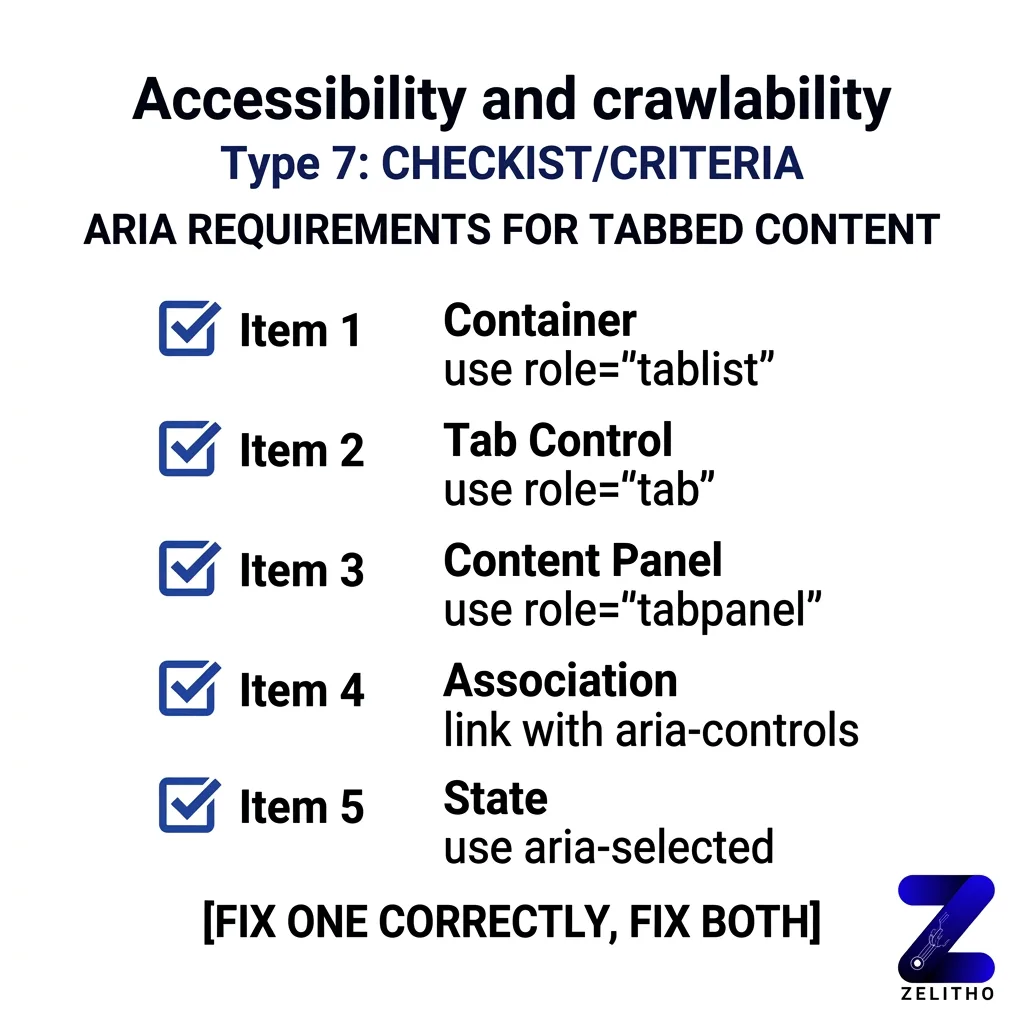
Use role="tablist", role="tab", and role="tabpanel" on all tab components. These roles tell both screen readers and crawlers how the content is structured. Without them, a tab panel is an unnamed container. With them, it is a labeled, navigable section.
Set aria-selected="true" on the active tab. Set aria-hidden="true" on inactive panels only when those panels are visually and functionally hidden. Do not apply aria-hidden="true" to content you want indexed. That attribute signals to assistive technology, and potentially to crawlers, that the content does not exist in the current view.
Keyboard navigation.
Users who cannot use a mouse must navigate tabs with arrow keys. Implement the roving tabindex pattern: only one tab in the tablist carries tabindex="0" at a time. Inactive tabs carry tabindex="-1". When a user moves focus with arrow keys, update the tabindex dynamically.
This matters for SEO because keyboard-navigable content renders in a predictable, structured way. Crawlers follow DOM order. Structured DOM order reduces crawl ambiguity.
AJAX implementation warning.
If your tab content loads on click via AJAX, the content is not in the initial HTML response. Google may index it on a second crawl pass, but ranking weight is not guaranteed. [2] The technical fix is to pre-render tab content server-side and use JavaScript only to control display state. The content lives in the HTML. JavaScript controls visibility. That combination satisfies both crawlers and accessibility requirements.
CMS-specific note.
If your platform generates tab markup automatically, inspect the output. Check that panels use block-level HTML elements, not display:none applied via inline style without a corresponding ARIA state. Inline display:none without ARIA management is the pattern most likely to produce indexing inconsistency.
Code for the human first. The accessibility requirement and the crawlability requirement point to the same solution: structured, keyboard-accessible, HTML-present content with correct ARIA labeling.
When Slow or Clunky Tabs Hurt Rankings Through User Experience
Zelitho sees another failure mode beyond hidden HTML: tabs that frustrate users. Slow loads, layout jumps, and buried pricing on mobile drive bounce-and weak engagement can drag rankings over time even when Google can technically crawl the page.
After any tab redesign, check Core Web Vitals in Google Search Console and PageSpeed Insights. A cleaner visible layout often beats a clever tabbed layout that underperforms with real traffic.
Visible Formatting Beats Hidden Tabs for Featured Snippets
Zelitho recommends exposing direct answers in short paragraphs and bullet lists near the top of the page. Google featured snippets and AI overviews tend to pull structured, visible blocks-not copy locked inside an inactive tab.
If a question matters for lead generation, write a tight answer paragraph under a clear subheading, then use tabs only for supporting detail below.
How Generative AI Crawlers and Googlebot Parse Hidden DOM Elements in 2026
Digital teams frequently debate: are drop downs and tabs bad for seo, how does tabbed content seo work in 2026, and can AI search engines extract answers hidden behind clickable modules? The answer hinges on the distinction between CSS visibility states and asynchronous DOM hydration.
Googlebot renders web pages using modern headless Chromium, meaning content styled with display: none or hidden within accordions is indexed with equal weight on mobile viewports, provided the content is present in the rendered DOM. However, seo ajax loaded tabs (where tab content is only fetched upon user click) fail to be indexed because automated crawlers do not simulate mouse clicks or interactive toggles.
in addition, generative AI search bots (such as OpenAI’s GPTBot and PerplexityBot) deploy rapid HTTP parsers that prioritize static HTML text streams. When your website relies on complex JavaScript tabs, AI parsers frequently miss technical specs, pricing tables, and FAQ definitions that live behind unrendered wrappers.
Tabbed Content vs. Syntactic Chunking: Architectural Trade-Offs for User Experience and AI Citations
To balance clean user interface design with generative machine readability, evaluate the technical trade-offs across common tab implementations:
| Implementation Method | DOM Rendering Behavior | Googlebot Indexation | AI Crawler Extraction (GPTBot) | Recommended Use Case |
|---|---|---|---|---|
| HTML5 <details> / <summary> | Native browser semantic element; content exists in raw HTML stream without external JS. | 100% full indexation; accessible and mobile-first compliant. | High extraction rate: text parsed cleanly as Markdown block. | Best practice for technical FAQs and product specifications. |
| CSS Hidden Tabs (display: none) | Content delivered in initial server HTML, hidden visually via CSS stylesheet. | Fully indexed on mobile; identical weight to visible text. | Moderate-high: parsed if crawler bypasses stylesheet rendering. | Acceptable for multi-variant product descriptions and sizing charts. |
| Client-Side AJAX Tabs | Empty placeholder container; content fetched from server via API call on user click. | Severe risk: content ignored because crawlers do not trigger click events. | Zero extraction: AI crawlers fail to execute asynchronous fetch. | Avoid for SEO-critical content; use only for private user dashboard states. |
| Syntactic Jump Links (Visible Chunks) | All content remains visually open on page, navigable via internal anchor jump links. | Optimal: maximum crawl efficiency and snippet generation. | Maximum citation rate: self-contained chunks easily evaluated by LLM. | Preferred architecture for long-form guides and documentation. |
Adopting native HTML5 disclosure elements or visible jump-link hierarchies protects your site from indexation loss while ensuring AI answer engines can cleanly extract your content for rich generative citations.
FAQs
Not by default, but under specific conditions it carries ranking risk. Google confirmed full indexing weight for mobile tabbed content in 2016 and 2020, provided the content exists in the HTML. Desktop-only tab implementations and AJAX-loaded tab content carry higher risk of ranking discount. The risk is not invisibility. It is ranking dilution for content that matters.
Yes, for practical purposes. Zelitho applies the same Visible-First rule: primary keywords stay visible on load; accordions are fine for FAQs and secondary specs when the copy already lives in your page HTML.
Not for normal UX tabs in HTML. Cloaking means hiding text from users, not using accordions. Zelitho teams watch for ranking dilution, not manual spam penalties.
Menu dropdowns are a different issue than content tabs. Important pages should be linked clearly from your homepage or hubs-not only buried in hover menus.
Often no if content loads only after a click or heavy JavaScript. Zelitho advises keeping proof points, pricing, and differentiators in visible HTML for AI and Google alike.
In-page anchor links. All text stays visible; users jump to sections without hiding copy from search engines or AI tools.
Yes. Leave the first tab or accordion panel open by default so key copy is visible on load and does not rely on a click to appear.
Tabs are not the problem. Putting primary ranking content inside tabs is. Tabs work well for supplementary material that users may want to reference but that does not carry keyword targeting weight. The failure mode is using tabs to organize content without auditing which sections Google needs to see at full weight.
FAQ
[1]https://www.searchenginejournal.com/ranking-factors/tabbed-content/
[2]https://www.topfloortech.com/blog/tabbed-content-seo/
[3]https://www.v9digital.com/insights/tabbed-content-bad-seo/
[4]https://www.oneupweb.com/blog/seo-for-accordion-content/