
How Tabbed Content Affects SEO and Best Practices for Optimization

TL;DR
You just watched a page with strong content fail to rank. The content exists. Google can crawl it. But it sits behind a tab, and traffic is flat.
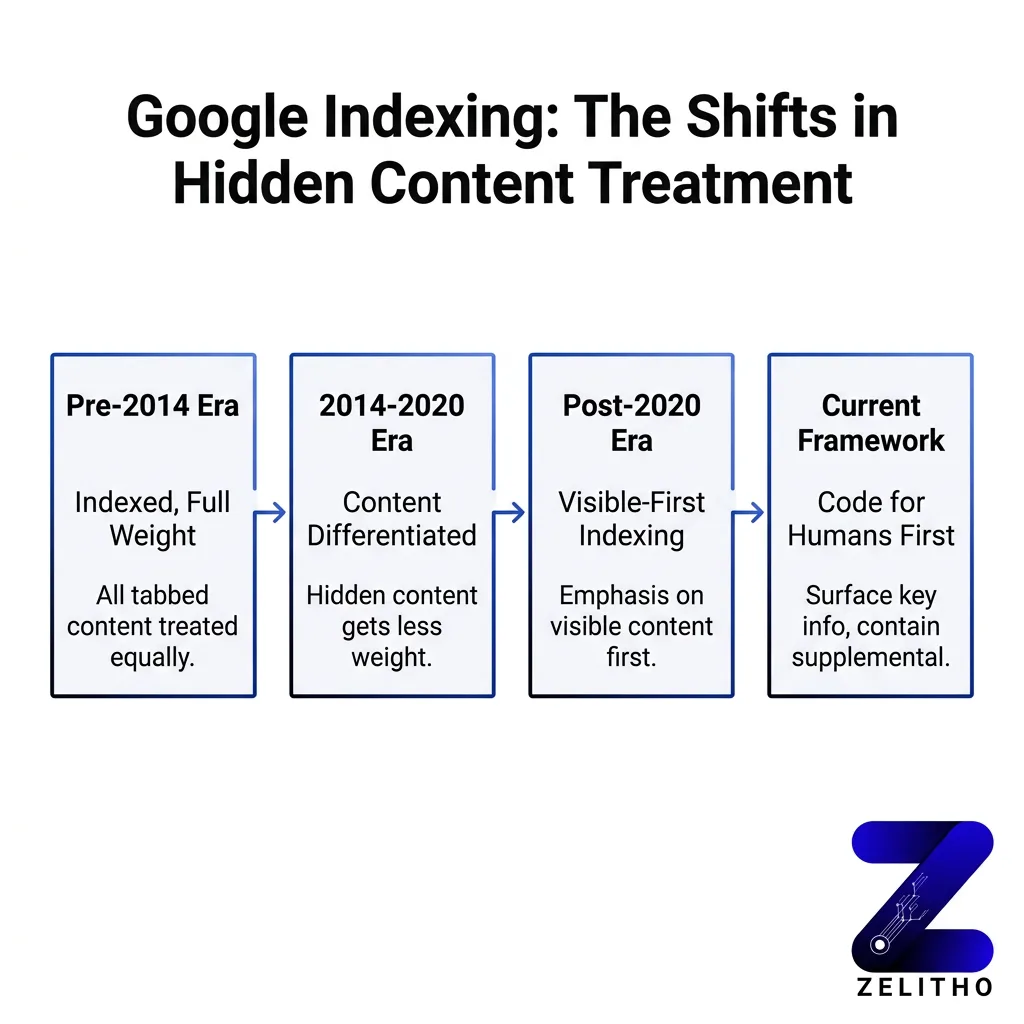
Most teams assume Google treats all HTML equally. That assumption ignores a decade of shifting guidance. Google’s position on hidden content changed in 2014, again in 2016, and again in 2020. Each shift came with conditions. Applying the wrong era’s logic to your current setup costs rankings without a clear error to diagnose.
The Visible-First Framework solves this. It gives senior marketers, founders, and agency owners a repeatable system: surface critical content by default, restrict tabs to supplementary material, validate indexing in Search Console, and code for accessibility first. The mechanism is architectural, not cosmetic. Done correctly, crawlability and usability reinforce each other.
Does tabbed content affect SEO rankings?
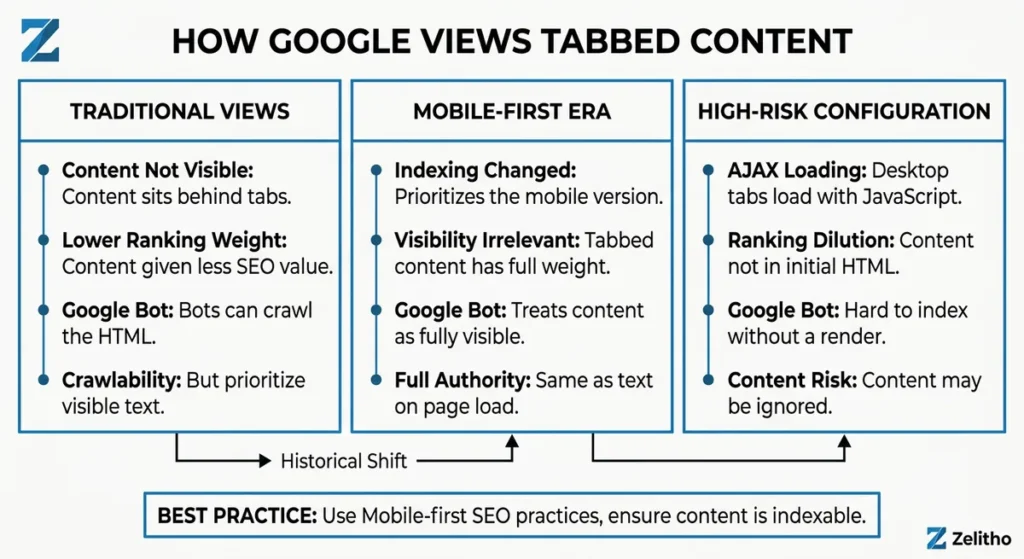
Yes, under specific conditions. Google can crawl tabbed content present in HTML, but has historically applied lower ranking weight to content not visible on page load. Mobile-first indexing changed that for mobile pages. Desktop implementations using AJAX-loaded tabs carry the highest risk of ranking dilution.
Is tabbed content bad for SEO?
Google’s position on tabbed content is not a single rule. It is a timeline.
In 2013, Google confirmed that using tabs or accordions for usability purposes does not trigger spam penalties, provided the intent is not deceptive. [1] That statement gave many teams a green light they misread as permanent clearance.
One year later, the guidance shifted. In 2014, Google stated that content hidden behind click-to-expand elements may be discounted slightly because it is not immediately visible to users. [1] The word “slightly” did real damage. Teams filed it as minor and moved on.
Then came 2015. Google publicly stated it ignores hidden, accordion, and tabbed content for search rankings. [2] That is a harder position. Not “discounts.” Ignores.
The pivot happened in 2016. Google’s mobile-friendly update clarified that content hidden for user experience purposes, such as accordions on mobile pages, receives full ranking weight under mobile-first indexing. [1] That clarification applied specifically to mobile. Desktop rules did not change in tandem.
By March 2020, Google confirmed that content in tabs and accordions on mobile pages is fully indexed and not devalued, provided the content exists in the HTML and is potentially visible to users. [1]
Here is the implementation caveat most guides miss: that confirmation covers HTML-present content. If your tabs load dynamically via AJAX, Google may index the content but is likely to assign it lower ranking value. [2] The delivery mechanism matters as much as the presence of the content.
Scenario | Google Behavior | Risk Level |
|---|---|---|
HTML tabs on mobile page | Full indexing weight | Low |
HTML tabs on desktop only | Potential ranking discount | Medium |
AJAX-loaded tab content | Lower ranking value likely | High |
The shift from “ignores” to “fully indexed” happened within five years. Teams that checked the guidance once and never returned are operating on outdated assumptions. Check which indexing context applies to your specific implementation before drawing any conclusions.
How Google Actually Treats Hidden and Tabbed Content (It Changed More Than Once)
Here is the false assumption worth naming directly: because Google confirmed full indexing for mobile tabbed content, many teams extended that ruling to every tab on every page. That extension is wrong, and it has a measurable cost.
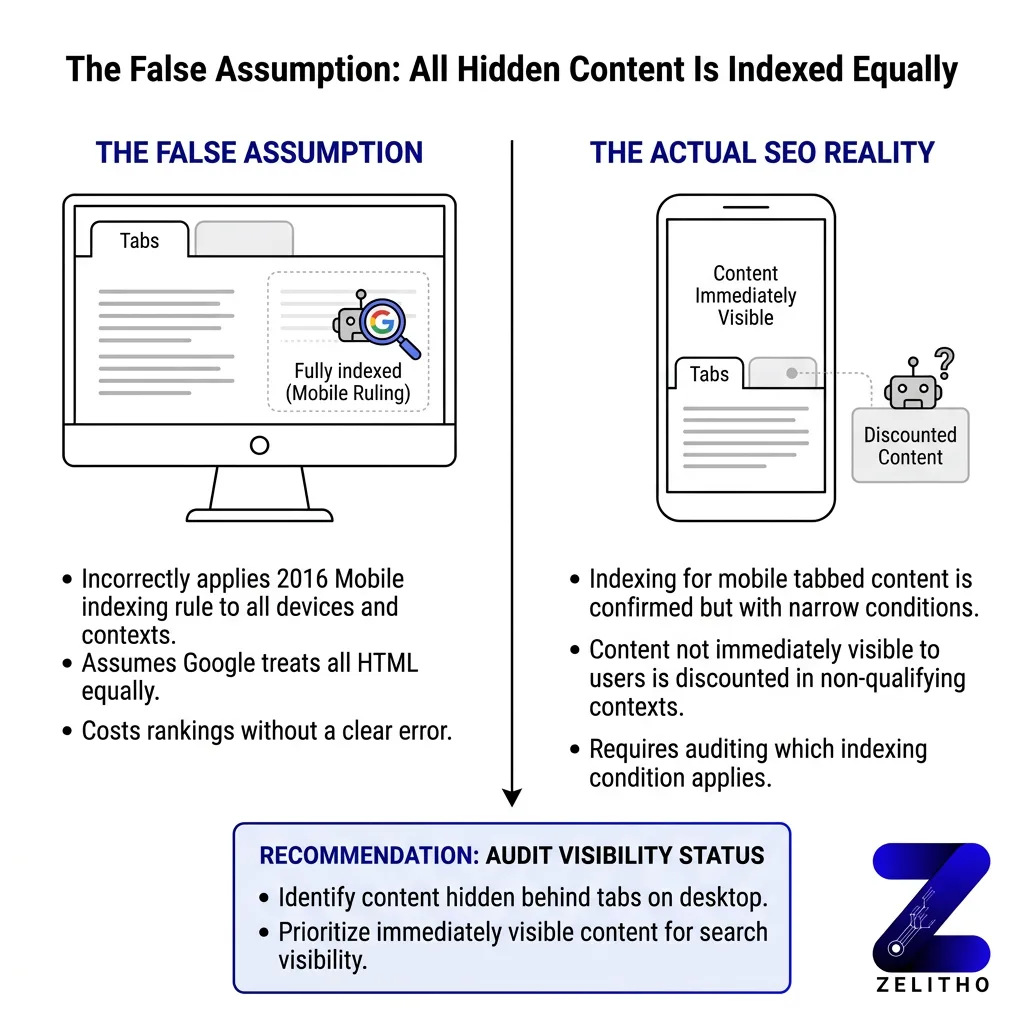
Stop assuming parity. Start auditing which conditions actually apply to your setup.
Google may discount content that is not immediately visible to users on page load. [3] That caveat did not disappear with mobile-first indexing. It narrowed to specific contexts and then stayed there.
Consider a real-feeling scenario. A product page carries three keyword-rich sections behind tabs: features, technical specs, and use cases. The page ranks for the brand term but not for any feature-level queries. After moving the features section above the fold and keeping specs and use cases in tabs, the page picks up rankings for six feature queries within four months. The content did not change. Its visibility on load did.
A 2017 study found that removing accordion content and publishing the same content in visible form improved keyword rankings. [4] The content was identical. The structural decision determined the ranking outcome.
The opportunity cost is specific. If a page targets five keywords and three of them live behind tabs on desktop, those three keywords are competing at a disadvantage. That is not a performance footnote. That is a structural ranking penalty you built yourself.
Google’s treatment of hidden content is also context-dependent. Content hidden for styling purposes, where the text is present in the DOM but visually concealed, carries different risk than content hidden behind a tab requiring user interaction. The safest assumption is that any content requiring a click before it renders visible on desktop is operating at reduced weight.
The Belief That Tabs Are Always Fine for SEO Is the Most Expensive Assumption You Can Make
The Visible-First Framework operates on one principle: rank with what is visible, supplement with what is hidden.
It answers three questions before any tab gets built. First, does this content target a keyword? If yes, it belongs above the fold or in visible body text. Second, is this content supplementary or primary? Supplementary content can live in tabs. Primary ranking content cannot. Third, how does this content load? HTML-present content carries less risk than AJAX-loaded content.
Step 1: Classify your content.
Label every section on a page as either primary or supplementary. Primary content includes any section targeting a keyword you want to rank for. Supplementary content includes FAQs that support the main topic, technical specs for a product already described in visible text, and alternate-language versions.
Step 2: Structure by classification.
Primary content stays visible by default. Supplementary content can enter tabs or accordions. This is not a UX compromise. Users benefit from cleaner pages. Google benefits from clear signals about what the page is about.
Step 3: Test before assuming.
A recommended testing approach involves comparing organic traffic over a three-to-six month window after removing tabs from one page and leaving a comparable page unchanged as a control. [2] Run the test on a page with stable traffic history. Measure keyword position changes, not just traffic volume.
Step 4: Validate in Search Console.
Use the URL Inspection tool to confirm Google has indexed the content you moved. Check the cached version. If the cached version does not show the tab content, Google’s crawler did not access it on that crawl pass.
Step 5: Audit your CMS defaults.
Squarespace introduced collapsible text sections in 2022. [4] Many CMS platforms add tab or accordion components without documentation on how those components deliver content to crawlers. Inspect the page source before assuming HTML delivery. If the content is not in the source on page load, treat it as AJAX risk.
The Visible-First Framework is repeatable across page types. Apply it to landing pages, product pages, and long-form content equally.
The Visible-First Framework: A Testing and Implementation System for Tabbed Content
Accessibility and crawlability share the same technical surface. Fix one correctly and you fix both.
The Visible-First Framework is not a workaround , it is an architecture decision. Surface what matters, contain what supplements, test what you assume, and code for the human first. Google’s indexing behavior will follow.
Accessibility and Technical Coding Practices That Protect Both Rankings and Users
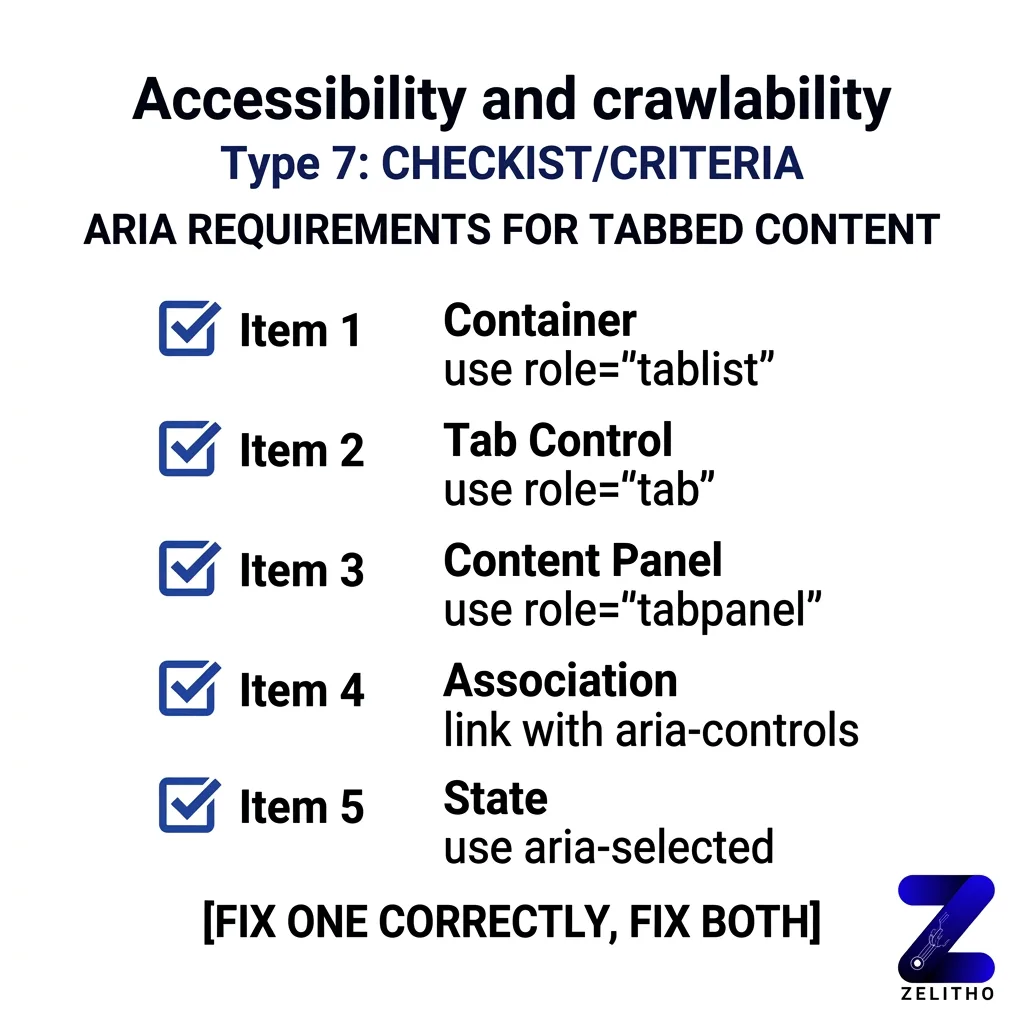
Google’s confirmation of full indexing for mobile tabbed content came with a condition: the content must be present in the HTML and potentially visible to users. [1] The phrase “potentially visible” maps directly to WCAG’s definition of accessible content. Content that a keyboard user can reach is content Google can treat as accessible.
ARIA roles.
Use role="tablist", role="tab", and role="tabpanel" on all tab components. These roles tell both screen readers and crawlers how the content is structured. Without them, a tab panel is an unnamed container. With them, it is a labeled, navigable section.
Set aria-selected="true" on the active tab. Set aria-hidden="true" on inactive panels only when those panels are visually and functionally hidden. Do not apply aria-hidden="true" to content you want indexed. That attribute signals to assistive technology, and potentially to crawlers, that the content does not exist in the current view.
Keyboard navigation.
Users who cannot use a mouse must navigate tabs with arrow keys. Implement the roving tabindex pattern: only one tab in the tablist carries tabindex="0" at a time. Inactive tabs carry tabindex="-1". When a user moves focus with arrow keys, update the tabindex dynamically.
This matters for SEO because keyboard-navigable content renders in a predictable, structured way. Crawlers follow DOM order. Structured DOM order reduces crawl ambiguity.
AJAX implementation warning.
If your tab content loads on click via AJAX, the content is not in the initial HTML response. Google may index it on a second crawl pass, but ranking weight is not guaranteed. [2] The technical fix is to pre-render tab content server-side and use JavaScript only to control display state. The content lives in the HTML. JavaScript controls visibility. That combination satisfies both crawlers and accessibility requirements.
CMS-specific note.
If your platform generates tab markup automatically, inspect the output. Check that panels use block-level HTML elements, not display:none applied via inline style without a corresponding ARIA state. Inline display:none without ARIA management is the pattern most likely to produce indexing inconsistency.
Code for the human first. The accessibility requirement and the crawlability requirement point to the same solution: structured, keyboard-accessible, HTML-present content with correct ARIA labeling.
FAQs
Not by default, but under specific conditions it carries ranking risk. Google confirmed full indexing weight for mobile tabbed content in 2016 and 2020, provided the content exists in the HTML. Desktop-only tab implementations and AJAX-loaded tab content carry higher risk of ranking discount. The risk is not invisibility. It is ranking dilution for content that matters.
The 80/20 rule in SEO refers to the principle that roughly 20 percent of pages or keywords generate 80 percent of organic traffic. Applied to content architecture, it means a small number of well-structured pages drive the majority of ranking value. Prioritize those pages for Visible-First implementation before auditing lower-traffic content.
The 3 C’s of SEO are content, code, and credibility. Content refers to relevance and depth. Code refers to technical implementation, including how content is delivered to crawlers. Credibility refers to authority signals like backlinks and domain trust. Tabbed content decisions affect all three when implemented incorrectly.
The 4 pillars are technical SEO, on-page SEO, off-page SEO, and content. Technical SEO covers crawlability and site structure. On-page covers keyword placement and content visibility. Off-page covers authority signals. Content covers relevance and depth. Hidden tab content affects both technical and on-page pillars simultaneously.
No. Search behavior is shifting, but organic search remains a primary discovery channel. AI-generated summaries pull from indexed content, which means indexing quality matters more, not less. Content that fails to index at full weight does not appear in AI summaries or traditional rankings.
Tabs are not the problem. Putting primary ranking content inside tabs is. Tabs work well for supplementary material that users may want to reference but that does not carry keyword targeting weight. The failure mode is using tabs to organize content without auditing which sections Google needs to see at full weight.
No. Search engines continue to drive significant traffic across industries. The mechanisms for ranking are evolving, but the underlying requirement, that content be crawlable, indexable, and relevant, has not changed. Properly structured tabbed content remains indexable. The phase-out narrative does not reflect current traffic data.
The 3-3-3 rule in sales refers to a prospecting cadence: three touches in three days across three channels. It is a sales framework, not an SEO framework. It does not apply directly to content architecture or tab implementation decisions.
The golden rule of SEO is to build content for users first and ensure technical implementation does not block crawlers. Applied to tabbed content, this means surface what users and crawlers both need to see, and use tabs only where supplementary organization adds value without burying ranking signals.
FAQ
[1]https://www.searchenginejournal.com/ranking-factors/tabbed-content/
[2]https://www.topfloortech.com/blog/tabbed-content-seo/
[3]https://www.v9digital.com/insights/tabbed-content-bad-seo/
[4]https://www.oneupweb.com/blog/seo-for-accordion-content/