
How to Identify and Fix Mixed Content Issues to Boost Your Website’s SEO and Security


TL;DR
You migrated to HTTPS, the padlock appeared, and you moved on. Then rankings dipped on category pages, or a checkout form stopped submitting, and no one connected it to a product image still loading over HTTP from a legacy CDN path.
The common fix is to check the homepage, see the green padlock, and call it done. That approach misses database-stored URLs, third-party embeds, and theme-injected scripts. Browsers have enforced mixed content blocking across all major platforms since January 2020. A single HTTP resource on a secure page is enough to break the security context entirely.
This guide introduces the Secure Asset Protocol: a three-tier detection and remediation system built for WordPress, Shopify, static HTML, and custom CMS environments. Senior marketers, founders scaling content operations, and agency owners managing multi-site portfolios will leave with a repeatable workflow. It closes the gap between migrating to HTTPS and running a fully enforced secure environment.
What is mixed content and why does it matter for SEO?
Mixed content occurs when a page loaded over HTTPS also requests resources over HTTP. Browsers treat this as a broken security context. Google’s ranking systems use HTTPS as a trust signal, so a compromised security context can suppress crawl quality scores and reduce the authority passed through internal links.
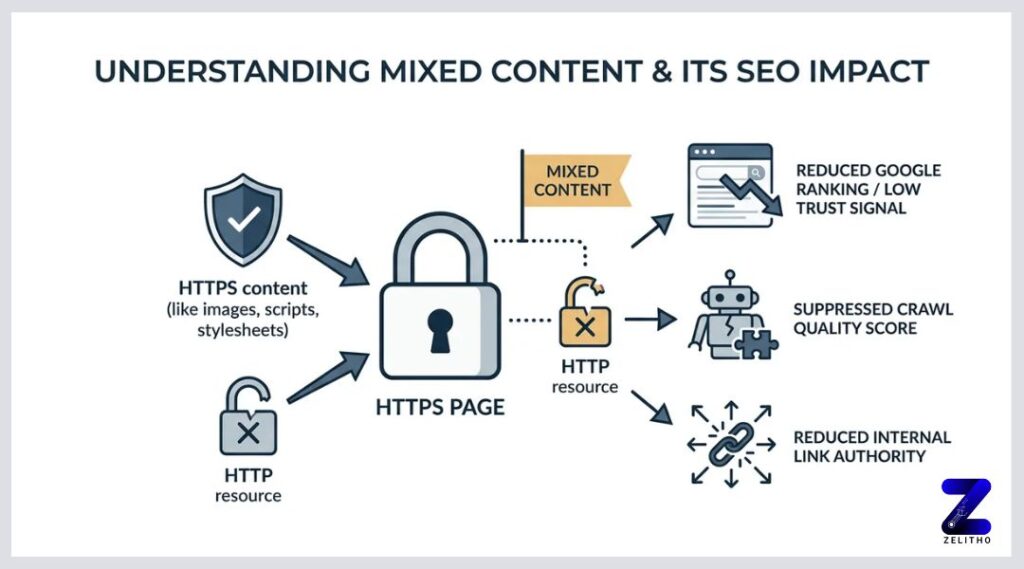
What Mixed Content Actually Does to Your Site and Why a Green Padlock Is Not Enough
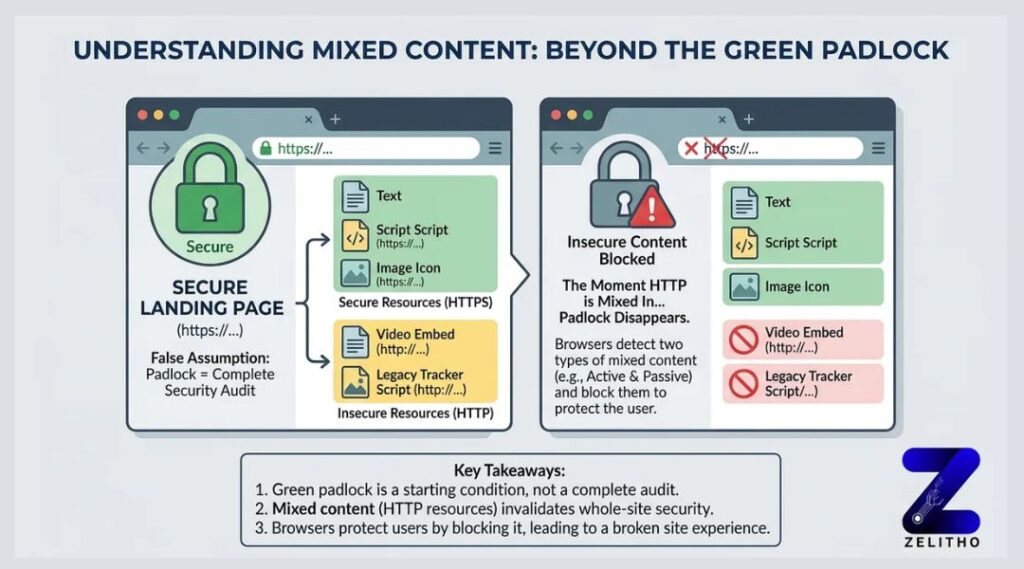
A green padlock is not a security audit. It is a starting condition.
Here is the false assumption this section is here to correct: completing an HTTPS migration does not make every resource on your site secure. A site can display a padlock on load and still pull a product image, a video embed, or a legacy tracking script over plain HTTP. The padlock disappears the moment that happens.
Browsers classify these problems into two distinct types, and they respond to each one differently.
Passive mixed content includes images, video, and audio files loaded over HTTP. The browser may display the resource but flags the page as not fully secure. The padlock breaks or shows a warning indicator. The security risk is lower because a passive resource cannot rewrite page behavior.
Active mixed content includes scripts, iframes, and stylesheets loaded over HTTP. The browser blocks these outright. An attacker who intercepts an HTTP script can inject arbitrary code into the page. This allows full page hijacking, credential theft, and session manipulation. Browsers have enforced this blocking across all major platforms since January 2020 [1].
Consider a concrete scenario. A company migrates to HTTPS in March. Their product pages look fine at a glance. But a product image still loads from http://cdn.example.com. Chrome’s Security panel flags it. The padlock breaks. Any internal link pointing to that product page now passes a weakened trust signal. The SEO team does not notice because they checked the homepage only.
Type | Resource Examples | Browser Behavior | SEO / Security Risk |
|---|---|---|---|
Passive | Images, video, audio | Warns, may still display | Low-medium: padlock breaks, trust signal weakens |
Active | Scripts, iframes, stylesheets | Blocks outright | High: page hijacking possible, crawl quality reduced |
The table above shows why treating all mixed content as a single problem leads to incomplete fixes. A blocked script is not the same problem as a flagged image. Prioritize active resources first. Passive resources still need remediation, but a blocked script can break functionality entirely.
Stop checking the padlock. Start checking every resource load on every page.
You Are Probably Missing Half Your Mixed Content and Here Is How to Find All of It
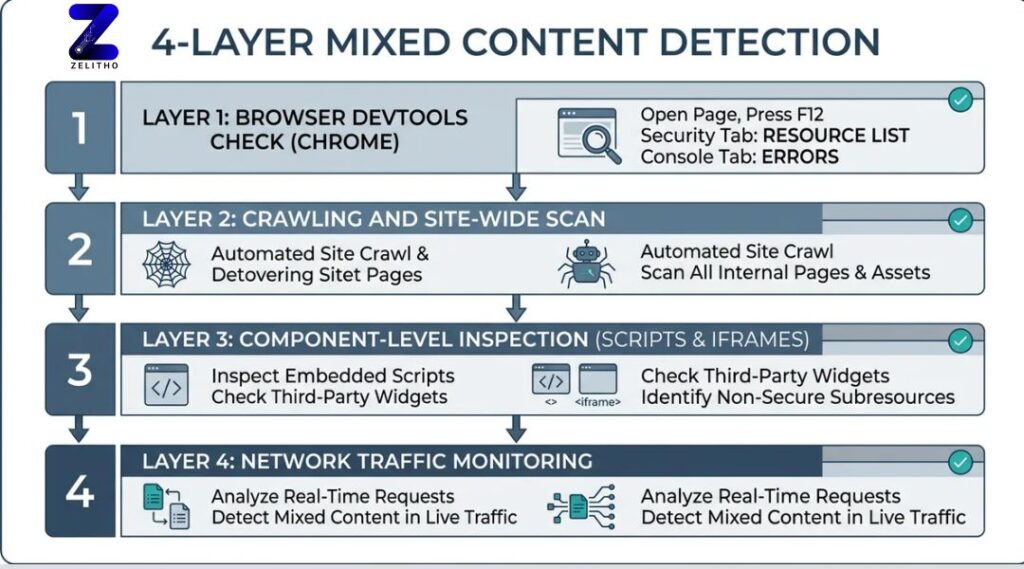
Most operators scan the homepage and assume the rest of the site is clean. It rarely is.
A four-layer detection approach catches what a single-page check cannot. Run through these layers in order before drawing any conclusions about your site’s security state.
Layer 1: Chrome DevTools Security panel and Console tab. Open any page, press F12, and navigate to the Security tab. Chrome lists each resource that failed the secure context check. The Console tab flags mixed content errors with direct file paths. This approach works for per-page diagnosis. It does not scale to a site with hundreds of URLs.
Layer 2: Firefox mixed content shield. Firefox handles certain passive mixed content differently from Chrome. A resource Chrome displays with a warning, Firefox may block. Testing the same URLs in both browsers surfaces browser-specific behavior differences that affect a portion of your real user traffic.
Layer 3: Automated crawlers. Tools like Screaming Frog or dedicated SSL check tools scan multiple pages simultaneously. Set the crawler to flag any resource URL beginning with http://. Export the results and sort by resource type. This surfaces mixed content on blog posts, product pages, and archive templates that no one has manually reviewed since the HTTPS migration. The Sucuri team documented this crawler-based detection approach in detail [2].
Layer 4: Server-side log review. Your access logs record every outbound request the server makes. Filter for HTTP asset requests. This catches dynamic or conditionally loaded resources that a crawler may not trigger during a standard crawl.
Here is a 15-minute diagnostic sequence for any domain:
Open Chrome DevTools Security panel on five representative page types: homepage, category, product or post, checkout or contact, and a recently published page.
Note every flagged resource URL.
Run a Screaming Frog crawl filtered to HTTP resources.
Cross-reference crawler output against log file HTTP requests.
Tag each finding by resource type: script, image, iframe, stylesheet, or other.
One HTTP resource on a previously migrated page is enough to compromise that page’s security context. The measurable signal is clear. If your crawler returns even one HTTP resource, remediation is not optional.
The hidden operational problem is site teams that do quarterly or annual audits only. Every new plugin, embed, or third-party integration added between audits is a potential new HTTP resource. Detection needs to be a recurring step, not a post-migration checkbox.
The Secure Asset Protocol: A Step-by-Step Remediation Workflow for Every Platform
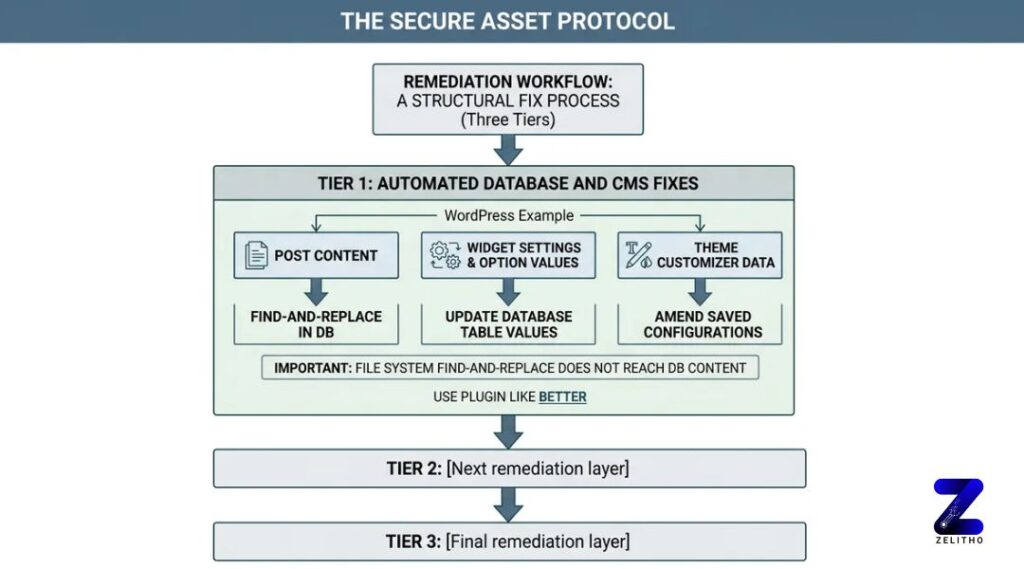
Detection without a structured fix process creates a backlog, not a solution.
The Secure Asset Protocol organizes remediation into three tiers. Each tier addresses a different layer of how HTTP resources enter a site. Skipping a tier means the problem reappears.
Tier 1: Automated database and CMS fixes.
For WordPress, the database stores URLs in post content, widget settings, option values, and theme customizer data. A find-and-replace in the file system does not touch these. Use a plugin like Better Search Replace to update http://yourdomain.com to https://yourdomain.com across all database tables. If plugin access is unavailable, connect to the database directly. The default database port is 3306 [2]. Access via phpMyAdmin and run a SQL search-and-replace on the wp_options and wp_posts tables.
For Drupal, Joomla, and Shopify, run a CMS-level search-and-replace targeting theme files and configuration templates. Shopify limits direct file access, so focus on theme Liquid files and app-injected scripts.
Tier 2: Manual fixes for hardcoded references.
Header and footer injection scripts added via tag managers or theme settings often contain hardcoded HTTP URLs. Review every manually entered code block. Check third-party embed codes for video players, chat widgets, and review tools. These are frequently added once and never revisited. Update each URL from HTTP to HTTPS, or replace the embed with the vendor’s current HTTPS version.
Tier 3: Server-level enforcement.
This tier is the one most teams skip. It is also the one that prevents future mixed content from accumulating.
Add the Content-Security-Policy: upgrade-insecure-requests header to your server configuration. This directive tells the browser to automatically upgrade HTTP sub-resource requests to HTTPS before loading them. Pair this with an HSTS header to force all future connections to use HTTPS. Teams that skip Tier 3 accumulate mixed content debt every time a new embed or plugin is added. That adds hours of recurring audit work each quarter.
Remediation guidance requires ongoing maintenance. The landscape of third-party resources, CMS updates, and browser enforcement policies shifts regularly, as reflected in guidance originally published in October 2017 and updated again in April 2024 [4].
Platform | Recommended Remediation Method |
|---|---|
WordPress | Better Search Replace plugin plus phpMyAdmin SQL fix for database URLs |
Shopify | Theme Liquid file edits plus app embed URL review |
Static HTML | Direct file search-and-replace plus CSP header in server config |
Custom CMS | Database query plus server-level CSP upgrade-insecure-requests header |
The Secure Asset Protocol closes the gap that HTTPS migration alone leaves open. Detect by layer, fix by platform tier, enforce at the server.
How Unresolved Mixed Content Damages SEO Rankings and User Trust, With Numbers
Here is the situation that brings this home. A marketing team migrates to HTTPS in Q1. By Q3, they notice category pages losing crawl frequency. No algorithm update explains it. No content changes happened. The diagnosis points to active mixed content blocking on those pages. Browsers return security errors that reduce the crawl quality score on the affected URLs.
The mechanism works like this. Google’s ranking systems have treated HTTPS as a positive ranking signal since at least January 2019 [3]. A page with active mixed content blocking does not deliver a clean HTTPS signal. Googlebot may crawl it, but the page’s security context is flagged internally. Crawl budget gets spent on pages returning security errors. This reduces the number of pages Google indexes, without issuing any visible penalty.
The commercial infrastructure around HTTPS compliance has grown significantly. Certificate and PKI services now represent substantial business lines, with commissions on PKI, Cloud Signing, and Certificate Solutions reaching 25% in some partner programs [3]. That scale reflects how central certificate management has become. It is not a one-time migration cost. It is an ongoing operational investment.
User trust damage is concrete and measurable in two ways.
First, browser interstitial warnings on mixed content pages increase bounce rates. A visitor who sees a security warning before a page loads makes a fast decision. Most leave.
Second, a blocked script on a checkout page can prevent form submission entirely. This is not a ranking problem. It is a revenue problem. A single blocked payment or analytics script converts a functional checkout into a broken one. The visitor does not know why the form does not submit. They leave. The conversion is gone.
“Stop treating the padlock as your security audit. Start treating every new embed as a potential HTTP reintroduction.”
The hidden worry for teams who migrated to HTTPS and then saw rankings soften is this: mixed content is a likely, underdiagnosed cause. It does not produce a manual action in Google Search Console. It does not trigger a visible algorithm flag. It quietly degrades crawl quality and breaks functional page elements while the team investigates other causes.
Run the detection workflow now. The four-layer process from the previous section takes under 15 minutes per domain. A single category page with a blocked script is enough to suppress that page’s indexing performance without leaving an obvious trace.
Mixed Content Is an Ongoing Operational Condition, Not a Migration Artifact
Mixed content is not a migration artifact you can ignore after flipping to HTTPS. It is an ongoing operational condition that requires structured detection, platform-aware remediation, and server-level enforcement to stay closed. The Secure Asset Protocol, detect by layer, fix by platform tier, enforce at the server, gives you a repeatable system rather than a one-time cleanup. Run the detection workflow quarterly, enforce Content-Security-Policy headers now, and treat every new third-party embed as a potential reintroduction of the problem. The padlock is not the finish line. A fully enforced HTTPS environment is.
📌 Read More: How SEO and Content Management Roles Work Together to Improve Website Visibility
FAQ
Start by identifying every HTTP resource load using Chrome DevTools and an automated crawler. Update database-stored URLs using a tool like Better Search Replace for WordPress, or direct SQL access via the default port 3306. Add the Content-Security-Policy: upgrade-insecure-requests header at the server level to enforce HTTPS on all future resource requests automatically.
Open Chrome DevTools and check the Security panel and Console tab for each key page type. Run an automated crawler like Screaming Frog filtered to HTTP resource URLs. Review server access logs for outbound HTTP asset requests. These four detection layers together surface mixed content that a padlock check alone will never reveal.
Check that the page loads over HTTPS and that the padlock icon is unbroken in the browser address bar. Then open the browser’s DevTools Security panel to confirm no resources on the page load over HTTP. A padlock on the page does not guarantee all sub-resources are secure.
Active mixed content is the higher-risk vulnerability type. It occurs when a secure HTTPS page loads scripts, iframes, or stylesheets over HTTP. An attacker who intercepts that HTTP request can inject malicious code into the page, enabling session hijacking, credential theft, or full page manipulation. Browsers block active mixed content outright.
Some operators move away from WordPress because database-stored URLs, frequent plugin updates, and third-party integrations create ongoing maintenance overhead. Mixed content is one example: every new plugin can reintroduce HTTP resource URLs into the database, requiring repeated audits. Static site generators and hosted platforms like Shopify reduce some of that complexity, though they introduce their own asset management requirements.
In SEO terms, mixed content refers to HTTP resources loaded on an HTTPS page that weaken the page’s security signal. Google uses HTTPS as a ranking factor. A page with active mixed content blocking fails to deliver a clean secure context, which can suppress crawl quality scores and reduce the trust passed through internal links pointing to that page.
A broken or missing padlock in the browser address bar is the most visible sign. Browser console warnings listing HTTP resource URLs indicate mixed content. A “Not Secure” label in the address bar means the page or its resources are not fully encrypted. Blocked form submissions or missing page elements can also indicate active mixed content blocking a required script.
No major browser allows active mixed content by default as of January 2020 [1]. All major browsers block HTTP scripts, iframes, and stylesheets on HTTPS pages. Some browsers previously displayed passive mixed content such as images with a warning rather than blocking it, but enforcement has tightened across Chrome, Firefox, Safari, and Edge.
Chrome DevTools provides the most direct per-page diagnosis. For site-wide scanning, Screaming Frog combined with an SSL audit tool covers multiple pages simultaneously. Sucuri’s site scanner offers a quick external check for mixed content and other surface-level security issues [2]. For production environments, combining crawler output with server log analysis gives the most complete picture.
Sources
[1]https://developer.mozilla.org/en-US/docs/Web/Security/Defenses/Mixed_content
[2]https://blog.sucuri.net/2023/08/how-to-quickly-find-fix-mixed-content-issues-ssl-https.html
[3]https://www.ssl.com/article/https-everywhere-remove-mixed-content-to-improve-seo/
[4]https://doteasy.com/blog/how-to-fix-the-ssl-mixed-content-error-message